Flagged Script Preview
cdn.pay-sdk.js
Checkout Team
analytics.bundle.min.js
Marketing Ops
chat-widget-loader.js
Experience Team
session-replay.js
Product Ops
Browser Script Security & Attack Prevention
Discover vulnerable scripts, block unauthorized execution in real-time, and drive remediation through automated security workflows.

Organisation
Home/Security Dashboard
Unified view of projects, scans, and browser-side security posture.
6
Total projects
6
Active projects
0
Closed projects
40
Total scans
| Scan Name | Project | Start Time | Status | Export |
|---|---|---|---|---|
| NovaCart 2026 CSS - CSS Scan - 05052026125559 | 05/05/2026, 18:26:58 | Completed | JSON · CSV · PDF | |
| NovaCart 2026 CSS - CSS Scan - 05052026125227 | 05/05/2026, 18:23:28 | Completed | JSON · CSV · PDF | |
| NovaCart 2026 CSS - CSS Scan - 05052026124920 | 05/05/2026, 18:19:30 | Completed | JSON · CSV · PDF | |
| NovaCart 2026 CSS - CSS Scan - 05052026124510 | 05/05/2026, 18:15:14 | Completed | JSON · CSV · PDF |
Trusted by AppSec, product security, compliance, and digital engineering teams.
Security Engine Capabilities
cdn.pay-sdk.js
Checkout Team
analytics.bundle.min.js
Marketing Ops
chat-widget-loader.js
Experience Team
session-replay.js
Product Ops
Enforce strict execution policies. Approve trusted scripts, instantly quarantine unauthorized DOM manipulation, and prevent digital skimming attacks.
Our intelligence engine continuously categorizes script exposure and criticality, automating threat triage so your team can focus strictly on remediation.
Generate definitive proof of client-side controls. Deliver immutable evidence for PCI-DSS without compromising continuous security operations.
From security dashboards to project overviews, organisation-wide scans, and detailed findings—see how TRIBAL CSS helps teams monitor scripts and stay PCI-ready.
Platform Tour
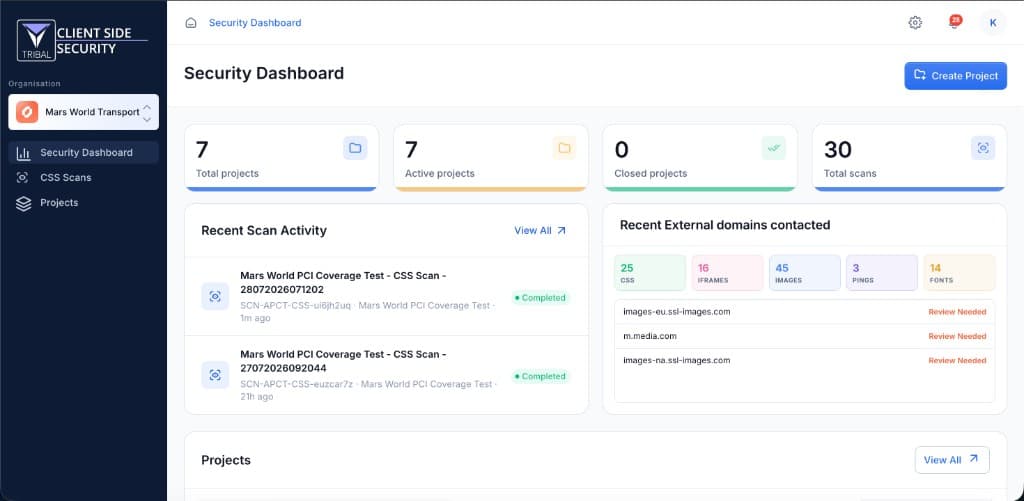
Track projects, scans, and client-side risk from one executive view—with recent scan activity, external domain contacts, and project health at a glance.
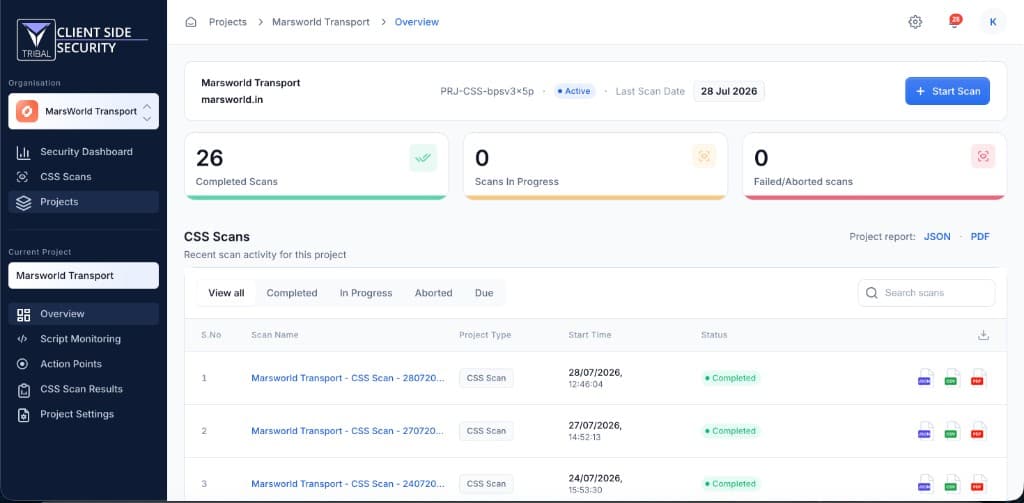
Open any CSS project and see scan progress, last-run dates, and full scan history—ready to launch new scans or export audit evidence.
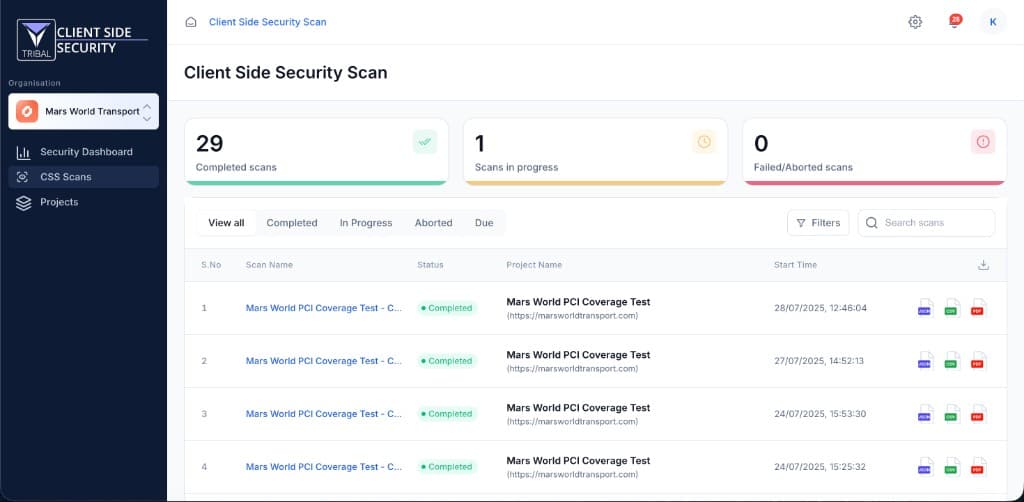
Manage every CSS scan across your estate from a single list—filter by status, search by project or domain, and drill into results fast.
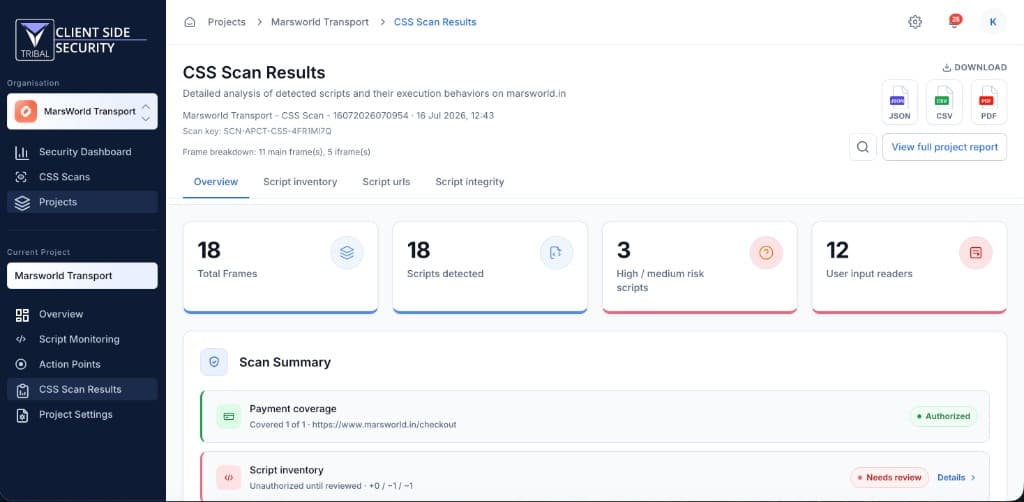
Open any completed scan into a full results view—script execution behavior, frame coverage, risk signals, and payment-page authorization status on one Overview.
Workflow
A simple, automation-first workflow to discover vulnerable scripts, assign ownership, and continuously validate fixes across your browser journeys.
Connect your application journeys to the engine.
Automatically map all client-side script execution.
Configure interval-based rescans for continuous coverage.
Route unauthorized script alerts directly to engineering.
One-stop solution for browser vulnerability visibility, automation, and faster risk closure.
Plans
Choose Essential for PCI merchants, Growth for multi-brand retail, or Enterprise for unlimited domains and custom governance.
$1,999/ year
PCI Merchant and Service Providers
PCI Merchant and Service Providers
Up to 1 Domain
4 scans per month for each domain
Script Inventory & Authorization Workflows
Standard PDF Export
Tagging Assignment & Tracking
Manual Execution
3 Users
12 Months
$4,999/ year
Mid-Market / Multi-Brand Retail
Mid-Market / Multi-Brand Retail
Up to 5 Domains
4 scans per month for each domain
Script Inventory & Authorization Workflows
Standard PDF Export
Tagging Assignment & Tracking
Manual Execution
10 Users
24 Months
Custom Pricing
Global Enterprise Portals
Global Enterprise Portals
Unlimited
Unlimited
Script Inventory & Authorization Workflows
Standard PDF Export
Tagging Assignment & Tracking
Manual Execution
Unlimited
Custom / Indefinite
Compare plans
$1,999/ year
PCI Merchant and Service Providers
$4,999/ year
Mid-Market / Multi-Brand Retail
Custom Pricing
Global Enterprise Portals
All plans include script inventory, authorization workflows, PCI reporting, and exportable audit evidence. Enterprise scopes are tailored during consultation.
Secure by default. Compliant by design.
Enforce strict client-side controls to stop data exfiltration, natively satisfying PCI DSS 6.4.3 and 11.6.1 through continuous inventory and integrity monitoring.
Every browser script across payment and high-risk journeys is discovered, classified, and kept current — without spreadsheet archaeology.
Unauthorized or unexpected script changes surface with clear ownership so security, engineering, and compliance can close the loop.
Export comprehensive proof packs detailing continuous inventory, execution authorization, and monitoring telemetry.
Designed for AppSec, GRC, and QSA workflows — verifiable controls you can take into an assessment.
Deploy autonomously in minutes. Map your baseline script inventory and enforce continuous monitoring on day one.
Yes. The platform supports script inventory, integrity checks, script authorization, and periodic monitoring with exportable evidence.
Yes. Security, engineering, compliance, and digital teams can assign, track, and close action points from one shared workspace.
We offer Essential ($1,999/year for up to 1 domain), Growth ($4,999/year for up to 5 domains), and Enterprise (custom pricing, unlimited domains). Contact us for a quote tailored to your scope, volume, and support requirements.
Discover how Tribal automates client-side security and enforces continuous compliance for your enterprise.
Enterprise Sales
sales@ontribal.com
Typical response time: within 1 business day.