TRIBAL AST · Application Security Platform

Find, Manage, and Remediate Application Security Risks

A centralized platform for security teams, engineering teams, consultants, and enterprises to manage penetration testing, findings, remediation, evidence, retesting, and security reporting across applications and environments.

Home / Security Dashboard
KA

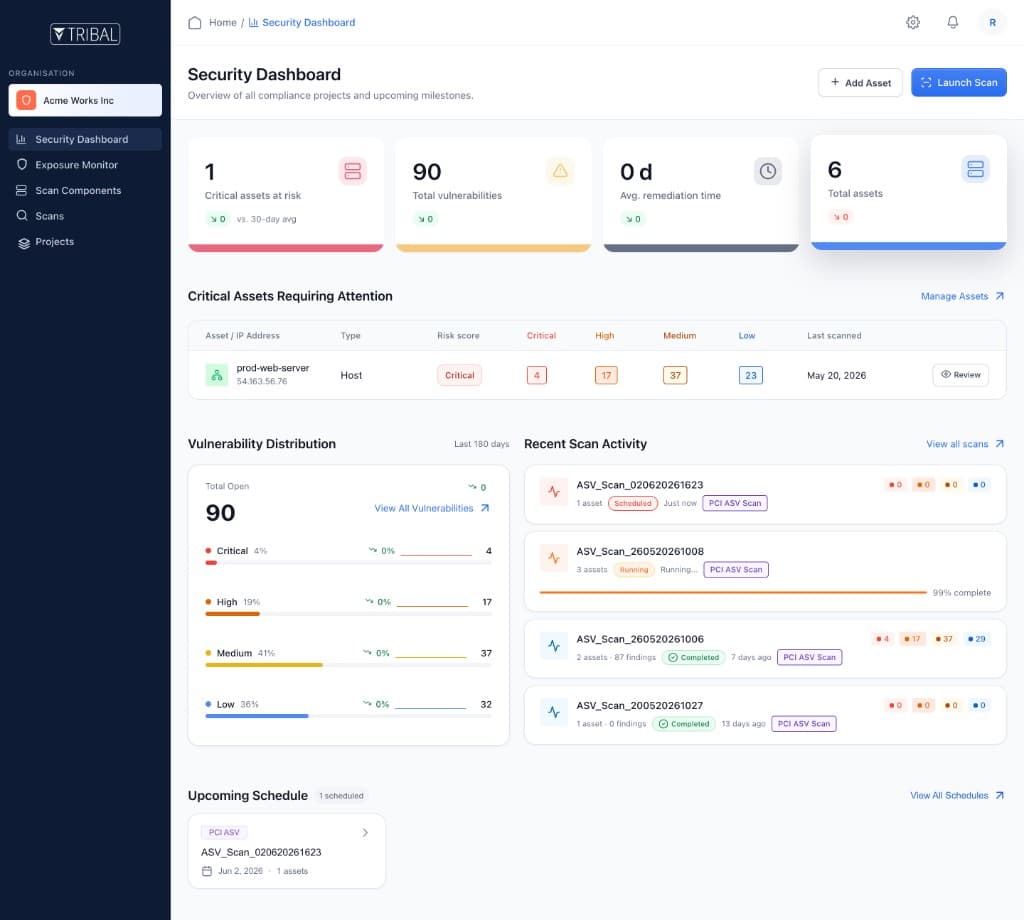
Application Security Dashboard

Overview of application posture, findings, and testing activity across Mars World Transport.

24

Applications

186

Endpoints

25

Open Findings

7

Manual Reviews

Applications Requiring Attention

ApplicationTypeRiskFindingsLast Tested
Customer PortalWeb AppHigh6May 6, 2026
Partner APIAPICritical4May 7, 2026
Admin ConsoleWeb AppMedium3May 5, 2026
Checkout APIAPIHigh8May 6, 2026

Risk Distribution

Current quarter

Critical12%
High28%
Medium40%
Low20%

Recent Scan Activity

AST_06052026_1241

Running

Customer Portal · Full Application Test

78% complete

Built for security teams, engineering teams, consultants, and enterprises.

Application Security, Managed in One Place

Instead of managing findings across spreadsheets, documents, emails, and disconnected tools, teams manage the complete security testing lifecycle from one platform.

Projects & Scope
Findings & Severity
Remediation Progress
Retest & Reports

What You Can Do

Security Testing Lifecycle, in One Workspace

Security Findings With Full Context

Broken Object Level Authorization

api.checkout.prod/v2/orders · Platform Team

CriticalOpen

Credential Stuffing Exposure

app.portal.prod/login · AppSec

HighIn Review

Insecure Local Storage

mobile-android:Payments · Mobile Eng

MediumResolved

Missing Signature Validation

api.partner.prod/webhooks · Security Team

HighOpen

Track Remediation End to End

Acknowledge findings, assign work, track progress, mark remediation implemented, and keep comments and supporting information with each issue — creating a clear record of how security risks are handled.

Evidence Management

Keep screenshots, files, and assessment artifacts associated with the relevant finding and assessment.

Retesting & Verification

Request a retest after remediation and preserve Finding → Remediation → Retest → Verification history.

Explore the AST workspace

From security projects and findings to remediation, evidence, and retesting — see how TRIBAL AST brings the application security testing lifecycle into one enterprise platform.

Platform Tour

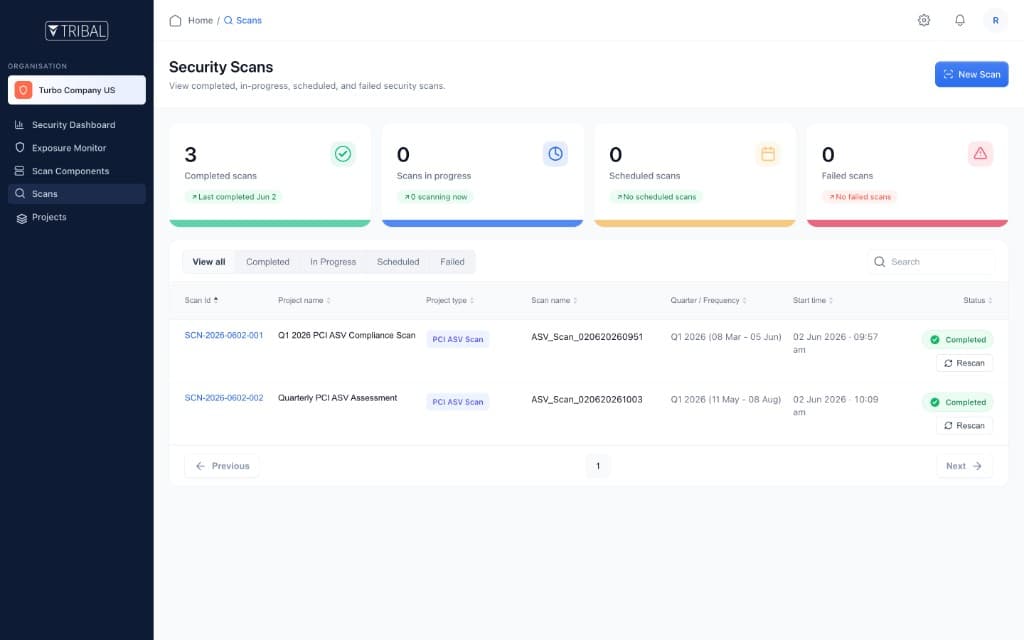
TRIBAL AST security projects and assessments
Assessments

Manage Security Projects

Create and manage security assessments for applications, APIs, mobile apps, networks, and other defined targets — organized by customer, environment, scope, and assessment period.

  • Projects by application, environment, and testing scope
  • Assessment periods and ownership in one workspace
  • Consistent structure across web, API, mobile, and infra
  • Clear visibility into active and completed assessments
TRIBAL AST security findings workspace
Findings

Manage Security Findings

Capture vulnerabilities and security findings throughout the assessment lifecycle with the context teams need to understand and act on risk.

  • Title, description, severity, and affected target
  • Impact, classification, and recommended remediation
  • Supporting evidence attached to each finding
  • Status and ownership for every issue
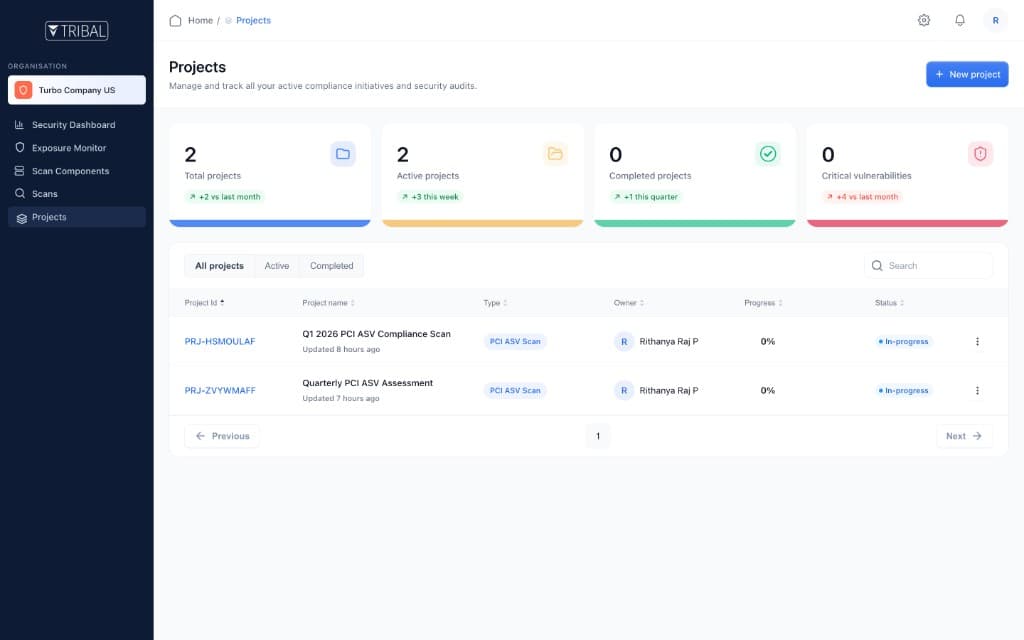
TRIBAL AST remediation tracking
Remediation

Track Remediation

Give engineering and security a structured path from discovery through verification — with assignment, comments, and a clear record of how issues are handled.

  • Acknowledge findings and assign ownership
  • Track remediation progress and status changes
  • Mark remediation implemented with supporting notes
  • Maintain activity history across teams
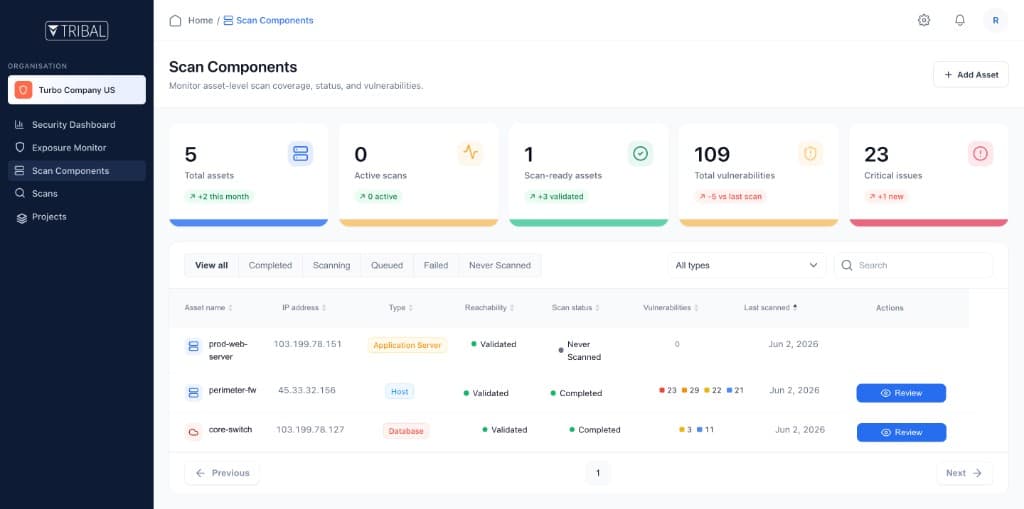
TRIBAL AST evidence and retesting workflow
Verification

Evidence, Retesting & Verification

Keep screenshots, files, and assessment artifacts linked to findings, then request retests and verify whether remediation addressed the issue.

  • Evidence stays connected to the related finding
  • Retest requests tied to remediated issues
  • Finding → Remediation → Retest → Verification history
  • Clear record of what changed and what was confirmed

How It Works

From Finding to Verified Remediation

A structured workflow helps teams move beyond identifying vulnerabilities to managing the full lifecycle of application security findings — from assessment through verification and reporting.

Assess · Remediate · Retest · Verify · Report
1

Security Assessment

Create and scope security assessments for applications, APIs, mobile apps, infrastructure, and other defined targets.

2

Security Finding

Capture findings with severity, impact, affected targets, classification, and recommended remediation.

3

Evidence & Impact

Attach screenshots, files, and assessment artifacts so teams have full context behind each security issue.

4

Remediation

Assign owners, track progress, add comments, and mark remediation implemented with a clear activity history.

5

Retest & Verification

Request a retest, verify whether the issue was addressed, and preserve Finding → Remediation → Retest → Verification history.

✓

Security Reporting

Turn assessment scope, findings, severity distribution, remediation status, evidence, and retest results into structured security reports.

Security Testing for Multiple Targets

One workflow across assessment types

Organizations can manage different testing activities while maintaining a consistent security workflow.

Web Applications

Application security testing

APIs

API security assessment

Mobile Applications

Android and iOS security testing

External Infrastructure

External security assessment

Internal Infrastructure

Internal security assessment

Cloud Environments

Cloud security assessment

Built for multiple teams

Everyone works from the same security context — findings, evidence, remediation, and verification in one shared workspace.

Security Teams

  • Centralized view of assessments and findings
  • Remediation status and retesting activity
  • Structured security reporting

Engineering Teams

  • Clear view of what needs to be fixed
  • Impact, affected targets, and expected remediation
  • Comments, assignment, and collaboration

Security Consultants

  • Assigned customer assessments in one workspace
  • Findings, evidence, actions, and retesting
  • Controlled access to authorized projects

Enterprise Organizations

  • Security testing across organizations and projects
  • Applications and environments with controlled access
  • Complete history from discovery to closure

Plans

Enterprise Application Security Platform

AST pricing is tailored to your assessment volume, applications and targets, remediation workflows, and reporting needs.

Essential

Application Security Testing

Custom Pricing

Focused application testing programs

Target Audience

Focused AppSec programs

Applications

Custom

Testing Cadence

Custom

Manual Security Testing

Included

Deliverables
  • Security Findings Report
  • Executive Summary
Users

Custom

Support

Email Support

Growth

Application Security Testing

Custom Pricing

Growing application portfolios

Target Audience

Growing application portfolios

Applications

Custom

Testing Cadence

Custom

Manual Security Testing

Included

Deliverables
  • Security Findings Report
  • Executive Summary
Users

Custom

Support

Email Support

Enterprise

Application Security Testing

Custom Pricing

Enterprises & Conglomerates

Target Audience

Enterprises & Conglomerates

Applications

Custom

Testing Cadence

Custom Cadence

Manual Security Testing

Included

Deliverables
  • Security Findings Report
  • Executive Summary
  • Custom Reports
Users

Custom

Support

Email Support

* Essential and Growth include 2 scans per endpoint per quarter. Enterprise cadence, endpoints, and reporting are tailored during consultation.

Structured records. Clear verification.

Compliance-ready security workflows

Maintain evidence through every stage of the testing lifecycle

Security testing supports broader compliance and risk programs. TRIBAL AST keeps structured records of assessments, findings, evidence, remediation, retesting, verification history, and security reports — without treating a completed assessment as automatic compliance.

Security assessmentsFindings & severityEvidence artifactsRemediation trackingRetest verificationSecurity reports
01

Centralized visibility

Manage assessments, findings, evidence, remediation, and retesting from one workspace instead of spreadsheets, emails, and disconnected tools.

02

Structured remediation

Give security and engineering a consistent path from discovery to verification — with ownership, comments, and status history on every finding.

03

Complete security history

Preserve the relationship between finding, remediation, retest, and verification result so stakeholders can see what changed and what was confirmed.

01Assess
02Remediate
03Retest
04Report

Built for security teams, engineering teams, consultants, and enterprises that need a defensible application security testing workflow.
Frequently Asked Questions

What is an application security platform?

An application security platform helps organizations identify, manage, remediate, verify, and report security risks across their applications and security assessments.

What can I manage with the platform?

You can manage security projects, applications and targets, findings, evidence, remediation activities, retesting, collaboration, and security reports.

Can the platform manage penetration testing?

Yes. The platform provides workflows for managing penetration testing assessments, findings, evidence, remediation, retesting, and reporting.

Can it manage API and mobile application security testing?

Yes. Security assessments can be organized for different target types, including web applications, APIs, Android applications, iOS applications, infrastructure, and other defined targets.

Can security consultants use the platform?

Yes. Partner and consultant access can be controlled around assigned organizations and projects, allowing consultants to work with the customers and assessments they are authorized to access.

Does the platform replace a compliance framework?

No. The platform supports security assessment, evidence, remediation, and reporting workflows that can contribute to compliance programs. Compliance ultimately depends on the applicable framework, scope, controls, and assessment requirements.

How does the platform help with remediation?

Findings can be assigned, discussed, supported with evidence, tracked through remediation, and submitted for retesting and verification.

One Platform for the Security Testing Lifecycle

Discover security risks. Organize assessments. Manage findings. Track remediation. Verify fixes. Maintain evidence and reports — all in one enterprise platform.

TRIBAL Application Security Test — submitted securely. Prefer email? sales@ontribal.com

What happens next?

  1. 1. Request a demo and walk through the platform.
  2. 2. Define your organizations, applications, and assessment scope.
  3. 3. Set up findings, remediation, evidence, and retest workflows.
  4. 4. Bring security, engineering, and consultants into one shared workspace.

Enterprise Sales

sales@ontribal.com

Typical response time: within 1 business day.